What Is a Shared IP VPN?
A shared IP VPN is a VPN service in which many users connect through the same server and appear online with the same public IP address, and that simple fact shapes almost everything about how the service behaves.
When you connect, your real IP address from your Pakistani ISP is hidden behind the server’s address, and every website you visit sees the same exit IP that dozens or hundreds of other users are using at the same moment.
Surfshark, our recommended VPN for Pakistan, works this way by default: its standard servers assign shared IP addresses, so your traffic blends into a crowd rather than standing out on an address that belongs only to you, and readers in Pakistan can try it with 80% off for our users through our Surfshark link.
The short answer to “what is shared IP VPN” is therefore straightforward. It is the default addressing model of almost every consumer VPN. You do not get a personal address. You get a seat on a shared one. That design is deliberate, not a shortcut, because sharing an address is what makes it hard for any single website to connect your browsing back to you from the IP address alone.
Understanding this matters because the shared IP VPN meaning is often confused with two nearby ideas. A shared IP is not the same as a dynamic IP, although the two often overlap. A dynamic IP changes each time you connect, while a shared IP is used by many people at once.
Most VPN servers give you an address that is both shared and dynamic: it changes when you reconnect, and other users hold it at the same time. A static IP, by contrast, stays the same across sessions, and a dedicated IP is a static address assigned to one account only.
This guide explains the shared IP VPN meaning in plain language, shows how the mechanism works, weighs the real benefits against the real limitations, and helps you decide when a shared address is enough and when you should pay extra for a dedicated one. Everything here is based on documented provider behaviour and published explanations from NordVPN, Private Internet Access, Comparitech and Surfshark itself, not on invented speed tests.
How a Shared IP VPN Works
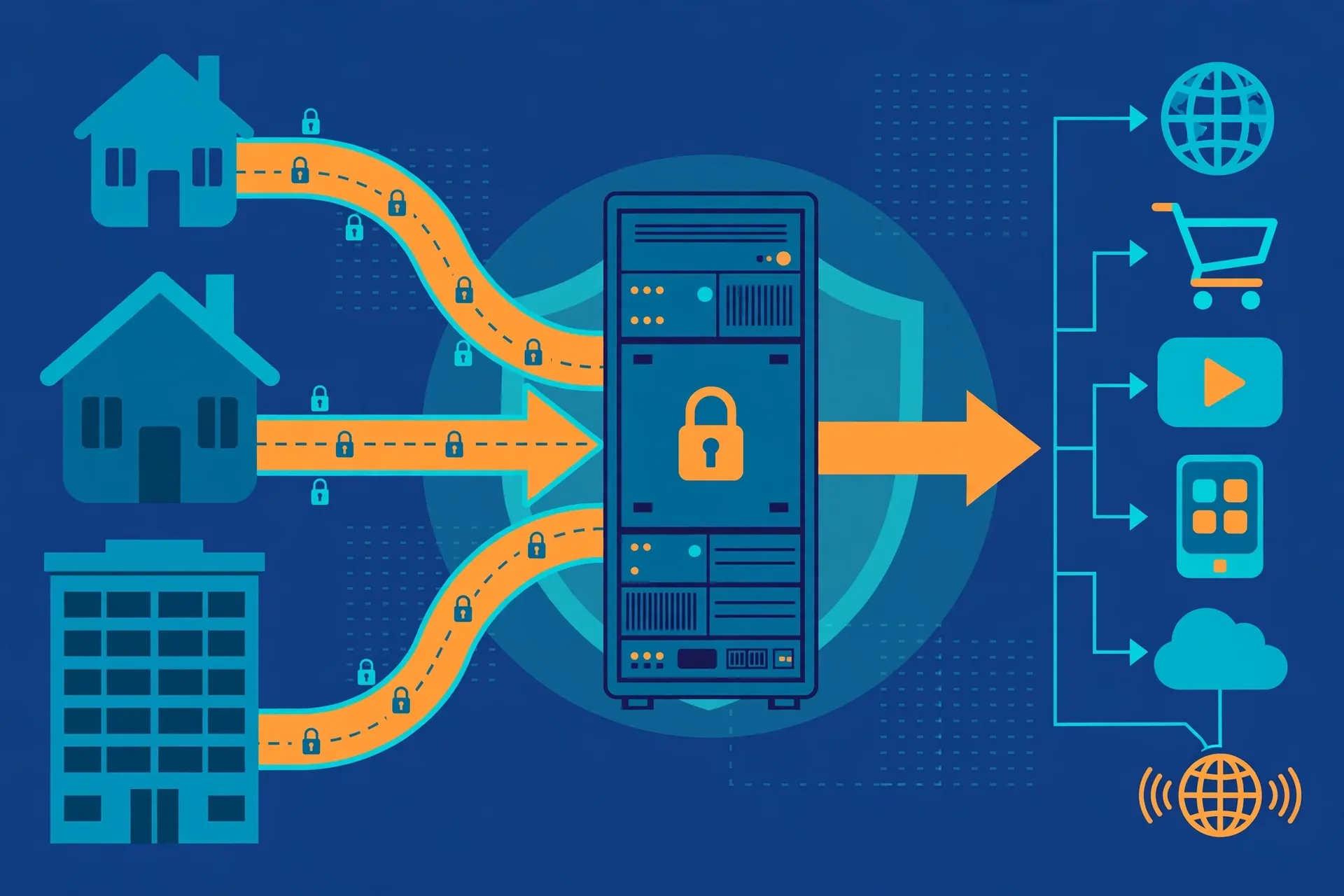
Connecting to a VPN server does not give your device a new identity on the internet. It gives your traffic a new exit point. Your device builds an encrypted tunnel to the server, and the server forwards your requests to websites using one of its own public IP addresses. The website replies to the server, and the server sends the response back down your tunnel.
Your home IP address never appears in that exchange.
The key detail is what happens when more than one person uses the same server. A VPN server typically holds a small pool of public IP addresses, sometimes just one, sometimes dozens. As users connect, the server hands out addresses from that pool. Once the pool runs out, new users are placed on addresses already in use.
From that point on, several people share a single public IP address at the same time, and the server keeps their sessions separate internally.
Network address translation, usually shortened to NAT, is the mechanism that makes this possible. NAT lets many private connections pass through one public address by tracking which outgoing request belongs to which user and returning each reply to the right tunnel. Your traffic is never visible to the other people sharing the address. Sharing a public IP does not mean sharing a network, a session, or any data.
Each connection stays encrypted and separate inside the tunnel.
Most providers rotate these addresses as well. When you disconnect and reconnect, you usually receive a different shared address, often from a different server in the same location. This rotation adds another layer of separation between your sessions, because the address you used yesterday is unlikely to be the one you use today.
Surfshark’s standard servers work this way, and the same pattern applies at NordVPN, Private Internet Access and most other large providers.
What Websites Actually See
A website that receives your visit sees only three things about your connection: the shared IP address, the rough location attached to it, and the fact that the address belongs to a data centre or VPN provider. It cannot see your name, your home address, or your real IP. It also cannot tell, from the IP alone, which of the many people sharing that address made a particular request.
That limitation cuts both ways. It protects your privacy, because your activity is mixed with everyone else’s. It also means the website treats you as part of a group, and if the group has a bad reputation, you inherit it. This shared reputation is the single most important trade-off of the model, and it is covered in detail later in this guide.
Shared, Dynamic, Static and Dedicated: Four Terms, One Picture
Confusion around these terms causes more bad buying decisions than any other part of VPN marketing. A shared IP is used by many people at once. A dedicated IP is used by one account only. A dynamic IP changes between sessions. A static IP stays the same between sessions. These are two separate dimensions, and providers combine them in different ways.
Surfshark’s own documentation makes the distinction clear. Its standard servers give you a shared IP that may be dynamic or static depending on the server. Its Static IP servers give you an address that stays the same every time you connect to that server, but that address is still shared with other Surfshark users. Its Dedicated IP add-on gives you a static address that belongs to you alone.
NordVPN and Private Internet Access describe the same split in their own guides, and Comparitech notes that dedicated addresses are usually sold as an extra-cost add-on.
Shared IP VPN Benefits
The first benefit of a shared IP VPN is privacy through numbers. When hundreds of people appear from the same address, no observer can attribute a single request to a single person using the IP alone. Your browsing blends into the crowd. This is the core reason providers chose sharing as the default: it is the addressing model that leaks the least about any individual user.
The second benefit is cost. A public IPv4 address is a scarce, expensive resource, and providers that assigned one address per user would need far more of them and far more servers. Sharing lets a provider serve many customers from a small pool of addresses, and that saving shows up in the subscription price.
This is one reason a service such as Surfshark can offer unlimited simultaneous connections at a low monthly price on a long plan, while dedicated IP add-ons cost extra.
The third benefit is flexibility. Because shared addresses rotate, you are not tied to one address that accumulates a history. If an address is blocked by a particular website, disconnecting and reconnecting usually gives you a fresh one. If a server is busy, switching to another server in the same country gives you a different address within seconds. That freedom to move is built into the model.
A fourth benefit, less often mentioned, is load balancing. Providers can place a shared address in front of several servers and spread users across them, so no single machine carries the whole load. Private Internet Access describes this as one of the practical reasons providers share addresses: it keeps services running smoothly when demand spikes, for example during a major sports event or a period of heavy news in Pakistan.
For readers in Pakistan, there is a fifth, practical benefit. A shared IP VPN hides your home IP from every site you visit, which matters on networks where traffic is monitored or throttled. Your ISP can see that you are connected to a VPN server, but it cannot see which sites you visit inside the tunnel.
That protection applies equally whether the exit address is shared or dedicated, but the shared model delivers it at the lowest price.
Shared IP VPN Limitations
Sharing an address means sharing its reputation, and that is the biggest limitation of a shared IP VPN. If another user on your address sends spam, scrapes a website aggressively, or tries to abuse a service, the address can be flagged or blocklisted. The next person to use it, which might be you, then faces CAPTCHA challenges, failed logins, or outright blocks, despite having done nothing wrong.
CAPTCHAs are the most common symptom. Search engines and large websites show extra verification steps when many requests arrive from one address in a short time, because that pattern looks like automated traffic. Readers who use a shared IP VPN will recognise the experience: a simple search suddenly demands that you prove you are human.
Disconnecting and reconnecting usually helps, because it moves you to a different address, but the annoyance returns whenever you land on a heavily used one.
A second limitation is account security friction. Banks, email providers and some government portals watch for logins from unfamiliar IP addresses. A shared address that changes every session can look suspicious, and some services respond with extra verification codes or temporary locks. This is not the VPN failing. It is the service doing its job, and it is a real cost of the privacy that sharing provides.
A third limitation is that some services refuse data-centre IP ranges entirely. Streaming platforms, ticketing sites and a few banks maintain lists of known VPN addresses and block them regardless of which user is behind them. A shared address from a popular VPN server is more likely to appear on such a list than a residential address, simply because it is used by so many people.
No shared IP VPN can guarantee access to every service, and any provider that promises otherwise is overstating its case.
A fourth limitation is performance variability. You share the server’s bandwidth and processing power with everyone connected to it. At quiet times this is invisible. At peak hours, one heavy user downloading large files can slow the server for everyone else.
Providers manage this with capacity planning and by adding servers, but the effect is real, and it is one reason the same server can feel fast in the morning and slow in the evening.
Finally, a shared IP gives you no stable identity for services that need one. If your office allows remote access only from approved addresses, or your bank expects you to log in from the same address each time, a rotating shared address will not work. That is the use case dedicated IPs exist for, and it is covered in the comparison below.
Shared IP vs Dedicated IP vs Static IP
The honest way to choose is to match the address type to the job. A shared IP is best when your priority is privacy at a low price and you can tolerate the occasional CAPTCHA. A dedicated IP is best when a service needs to recognise you consistently, for example online banking, a work allowlist, or an account that locks you out after address changes.
A shared static IP sits between the two: the address stays the same, which reduces login friction, but it is still shared, so its reputation is still communal.
Surfshark offers all three. Standard servers use shared addresses at no extra cost. Static IP servers, included in the regular subscription, give you a consistent address that is still shared with other users. The Dedicated IP add-on gives you an address that is yours alone, and Surfshark’s own pages describe it as working with all of its protocols, including WireGuard, IKEv2 and OpenVPN.
Two details about Surfshark’s Dedicated IP need a caution flag, because published sources disagree. Third-party summaries put the add-on price at around $3.75 per month, but we could not verify that figure on Surfshark’s own pricing page at the time of writing, so treat it as unconfirmed and check the current price before buying.
Surfshark’s own pages also disagree with each other on coverage, listing 15 locations in one place and 20 in another. The exact list should be checked in the app before you subscribe for a specific city.
| Feature | Shared IP VPN | Shared Static IP | Dedicated IP |
|---|---|---|---|
| Who uses the address | Many users at once | Many users at once | One account only |
| Address changes between sessions | Usually yes | No | No |
| Privacy by blending into a crowd | Strong | Moderate | Weak |
| CAPTCHA and block risk | Higher | Medium | Lower |
| Login friction at banks | Higher | Lower | Lowest |
| Works with IP allowlists | No | Sometimes | Yes |
| Extra cost | Included | Included with Surfshark | Paid add-on |
| Best for | Everyday browsing, streaming, general privacy | Services that prefer a stable address | Banking, work access, accounts that flag changes |
NordVPN, Private Internet Access and Surfshark all agree on the underlying trade-off, and it is worth stating plainly. You trade anonymity for reputation. A shared address hides you in a crowd but carries the crowd’s history. A dedicated address gives you a clean, stable reputation but removes the crowd entirely, so everything done from it can be attributed to one account.

Shared IP VPN Use Cases in Pakistan
Everyday browsing is the natural home of a shared IP VPN. Reading news, searching, shopping and using social media do not need a stable address, and the privacy benefit of blending into a crowd is at its strongest here. For most readers in Pakistan, this single use case justifies the shared model on its own.
Streaming and geo-restricted content are a second use case, with a caveat. A shared IP lets you appear from another country, which is the whole point, but popular streaming services actively block known VPN addresses. Success varies by provider, server and day, and a shared address that works today may be blocked tomorrow.
This is normal for the model, not a defect in any one service, and it is why providers rotate addresses and add new servers.
Peer-to-peer sharing is a third use case where sharing helps. When many users appear from one address, it is harder for an outside observer to connect a particular transfer to a particular person. Providers that support P2P on shared servers, including Surfshark and Private Internet Access, rely on exactly this property.
Readers should still follow the law and the provider’s terms, since a shared address is not a licence to break either.
Remote work and study form a fourth use case, but with a split. General work, such as email, video meetings and cloud documents, works well on a shared address. Our own guides to Google Meet and Microsoft Teams describe the same pattern: the VPN rarely causes the problem, and the fix is usually server choice or protocol settings.
Access to a corporate system that allowlists specific addresses is the exception, and that is a dedicated IP job.
A fifth use case is public Wi-Fi. On a cafe, university or airport network in Lahore, Karachi or Islamabad, a shared IP VPN encrypts your traffic and hides your real address from anyone on the same network. The shared nature of the exit address adds nothing and takes nothing away here. The encryption is what matters, and every reputable provider encrypts regardless of address type.
When a Shared IP VPN Is the Wrong Choice
A shared IP VPN is the wrong choice when a service must recognise you. Online banking is the clearest example. Banks in Pakistan and abroad use the IP address as one signal among many, and a new shared address on every login can trigger security holds, SMS codes, or temporary blocks.
If you log in to the same bank every day, a dedicated IP or a shared static IP will cause far less friction.
Work systems with allowlists are a second clear case. If your employer, university, or client only permits connections from approved addresses, a rotating shared address will be rejected every time. Ask the administrator whether a dedicated IP can be added to the allowlist before you pay for one, since the add-on only helps if the specific address is approved.
Email sending is a third case. If you send bulk or business email, the reputation of a shared address can hurt deliverability, because other users’ behaviour affects whether your messages reach the inbox. Businesses that send mail should use a dedicated sending address or a proper email service, not a shared VPN address.
Account creation is a fourth case worth knowing about. Some services block sign-ups from known VPN ranges, and a heavily shared address is more likely to be on those lists. If you need to create an account on a service that is strict about this, try a less busy server, a different country, or a dedicated address, and expect some trial and error.
Finally, a shared IP is the wrong choice if you need a fixed address for your own server, camera, or remote desktop. Those setups need an address that never changes and belongs to no one else. A VPN’s dedicated IP can serve that purpose in some cases, but a proper static address from your ISP or a cloud provider is usually the cleaner solution.
How to Check Which IP Type You Have
You do not need to take a provider’s word for it. Connect to the VPN, then open an IP checker and note the public address. Disconnect, reconnect to the same location, and check again. If the address changes, you have a dynamic address. If it stays the same across sessions, you have a static one.
To test whether it is shared, compare notes with another user on the same server, or simply check the address against public reputation tools. If the address appears in VPN blocklists or is flagged as a data-centre address, it is almost certainly shared, since dedicated addresses are rarely listed that way.
Our companion test guide covers this validation workflow step by step, including DNS leak checks and WebRTC checks, so this guide keeps the summary short by design.
One check matters more than the rest: confirm that your real IP is actually hidden. An IP checker should show the VPN server’s location, not your city in Pakistan. If it shows your real location, the VPN is leaking or not connected, and the address type is irrelevant until that is fixed.
Our guide to OpenVPN explains the protocol side of that connection, and the WireGuard test checklist covers verification in detail.
Shared IP VPN and Surfshark
Surfshark is our recommended VPN for Pakistan, and its default behaviour is a good illustration of everything in this guide. Standard servers assign shared IP addresses, which is why the service can offer strong privacy at a low price with unlimited simultaneous connections. The shared model is not a limitation Surfshark hides.
It is the design, and it is the reason the service works well for everyday browsing, streaming and public Wi-Fi.
Where Surfshark goes further than some rivals is in offering the two upgrades in the same app. Static IP servers give you a consistent address without extra cost, which helps with services that dislike changing addresses.
The Dedicated IP add-on, for readers who need an address of their own, is available in a list of cities that Surfshark’s own pages describe inconsistently, so check the current list in the app before subscribing.
Readers in Pakistan can get 80% off for our users through our Surfshark link, and the plan pages on our site cover Surfshark pricing in Pakistan and the Surfshark free plan and trial in detail.
Surfshark — our recommended VPN for Pakistan
Shared IP privacy by default, with static and dedicated IP upgrades when you need them — 80% off for our users.
Other providers follow the same model with different details. NordVPN’s standard servers use shared addresses, and its dedicated IP is a paid add-on, as its own blog explains. Private Internet Access likewise uses shared addresses by default and sells dedicated IPs separately. IVPN and TorGuard, which we have reviewed on this site, also default to shared addressing.
The pattern is universal, so the decision is rarely about which provider to pick. It is about whether the shared default fits your use case, and the table above is the fastest way to answer that.
Shared IP VPN Compatibility
Compatibility is rarely a problem with a shared IP VPN, because the address type does not change which apps or devices the VPN supports. Surfshark, NordVPN and Private Internet Access all run on Windows, macOS, Android, iOS and Linux, and the shared address works the same on each.
Browser extensions, routers and smart TVs follow the same rule: if the VPN app supports the device, the shared address works on it.
The exceptions are services, not devices. A few banks, government portals and streaming platforms treat VPN addresses differently from residential ones, and a shared address is more likely to be flagged than a dedicated one. That is a property of the address’s reputation, not of your device, and switching devices will not fix it. Switching servers, or upgrading to a dedicated IP, usually will.
One compatibility note matters for readers in Pakistan. The PTA requires registration of VPNs used for commercial purposes, and businesses and freelancers using a VPN for work should check the current registration requirement before relying on any provider.
This guide does not give legal advice, and the registration rules have changed before, so verify the current position from the PTA or a qualified adviser rather than from any VPN blog, including this one.
Frequently Asked Questions
What Does Shared IP VPN Do?
A shared IP VPN routes your traffic through a server whose public IP address is used by many people at the same time. It hides your real IP address, encrypts your connection, and makes it hard for websites to identify you from the IP alone. It does not hide your identity from services you log in to, and it does not make you anonymous on its own.
Which Use Cases Require It?
No use case strictly requires a shared IP, but several suit it best: everyday browsing, streaming, public Wi-Fi, and general privacy at a low price. Use cases that require a stable, personal address, such as banking, work allowlists and email sending, are better served by a dedicated IP or a shared static IP.
What Does This Feature Not Guarantee?
A shared IP VPN does not guarantee access to any particular website or streaming service, does not guarantee you will never see a CAPTCHA, does not guarantee a clean reputation, and does not guarantee a fixed address. It also does not guarantee anonymity: logging in to an account, accepting cookies, or revealing personal details can still identify you. The guarantee it does offer is narrower and honest.
Your real IP stays hidden, and your traffic stays encrypted between your device and the server.
Surfshark — our recommended VPN for Pakistan
Start with shared IP privacy by default and upgrade only if you need a dedicated address — 80% off for our users.
Conclusion
A shared IP VPN is the default for a reason. It is cheap, private by design, and flexible enough for almost everything most readers do online. Its weaknesses are real but manageable: shared reputation, CAPTCHAs, login friction and the occasional block.
When those weaknesses start costing you time every day, that is the signal to look at a shared static IP or a dedicated IP, not a signal that VPNs do not work.
For most readers in Pakistan, the shared default is the right starting point, and Surfshark’s version of it, with its free static IP servers and optional dedicated IP add-on, covers the full range from everyday browsing to the stricter cases in this guide.