
A VPN kill switch is a safety feature that automatically blocks your internet traffic if your VPN connection drops unexpectedly, so your real IP address and unprotected data are not exposed while you are disconnected — and it is a feature worth checking before you choose any VPN, including Surfshark, whose apps include a kill switch with system-level modes documented on its official site.
In plain language, the VPN kill switch meaning is simple: no VPN tunnel, no internet. Instead of quietly falling back to your normal connection, your device pauses all traffic until the secure tunnel is back.
That one decision — block rather than leak — is the whole point of the feature, and this guide explains how it works, when it helps, where it falls short, and how it behaves on the devices people in Pakistan actually use every day.
If you are new to VPNs in general, start with the basics on Free VPN Pakistan and then come back to this feature guide, because a kill switch only makes sense once you understand what the encrypted tunnel itself is doing.
What Is VPN Kill Switch? A Direct Definition
Let us answer the primary question directly. What is a VPN kill switch? It is a monitoring and blocking mechanism built into a VPN app, or provided by your operating system, that watches the status of your VPN connection continuously.
The moment it detects that the connection to the VPN server has been lost — and that loss was not a deliberate disconnection by you, in standard mode — it blocks some or all internet traffic on your device. When the VPN reconnects, normal traffic resumes.
Three parts of that definition matter. First, the action is automatic. You do not need to notice the drop, and in real life you usually will not, because many drops last only a few seconds. Second, the action is blocking, not warning. A notification that arrives after your traffic has already leaked is not protection. Third, the scope varies.
Some kill switches block everything on the device, while others close or block only the apps you have chosen. That difference is important enough that we compare the two approaches in detail below.
A kill switch is not a separate product, a separate subscription or a hardware device. It is a setting and a behaviour inside software you already have. Providers name it differently, which confuses beginners. ExpressVPN calls its version Network Lock in older documentation and Internet Kill Switch in current support pages. Proton VPN offers a Standard mode and a stricter Advanced mode.
Surfshark documents Soft and Strict modes, both working at system level. NordVPN offers an Internet Kill Switch alongside an App Kill Switch on supported platforms. The names differ, but the underlying promise is the same: traffic should not travel outside the tunnel by accident.
VPN Kill Switch Meaning in Everyday Language
Think of the VPN tunnel as a locked corridor between your device and the internet. While you are inside the corridor, anyone watching from outside sees the corridor, not you. A kill switch is the guard at the door. If the corridor collapses for any reason, the guard does not let you walk outside in the open while it is rebuilt.
The guard simply keeps you indoors, offline, until the corridor is safe again.
The trade-off is honest: staying indoors interrupts your call, download or banking page, but a visible interruption is better than an invisible leak.
VPN Kill Switch Explained: How the Mechanism Works
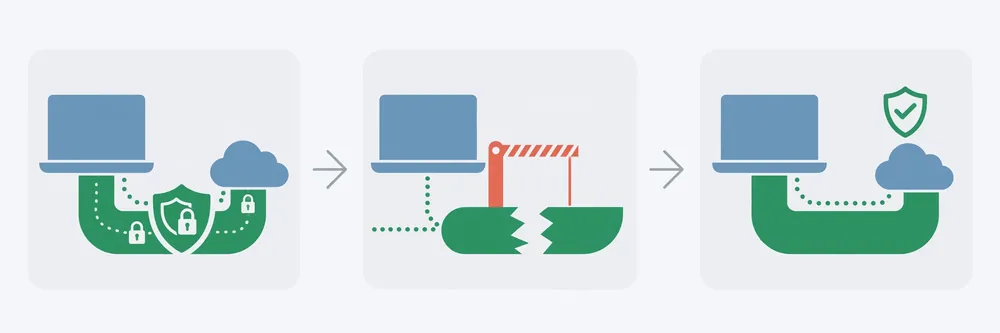
With the VPN kill switch explained step by step, the mechanism is easier to trust because there is no magic in it. Official provider documentation describes a consistent sequence, even though each app implements it with different system tools underneath.
Step 1: Continuous Monitoring
While you are connected, the VPN app keeps track of the tunnel status and, in NordVPN’s published description of the process, watches for changes in connection status or IP address. If everything is stable, the kill switch does nothing at all. It is a background safeguard, not an active filter on every website you visit.
Step 2: Detecting a Drop
A drop can be triggered by much more than a VPN provider failing. Surfshark’s official feature page lists unstable internet connections, firewall and antivirus conflicts, VPN server issues and network congestion among the common causes.
Add to that list the everyday events covered later in this guide: switching from Wi-Fi to mobile data, a router restarting, a laptop waking from sleep, an operating system update, or an app crash. The kill switch does not need to diagnose why the tunnel failed. It only needs to detect that the tunnel is no longer there.
Step 3: Blocking Traffic
Once a drop is detected, the block is applied. Depending on the type and the platform, that block may be enforced through operating system firewall rules, through the VPN interface settings, or through the mobile operating system’s own VPN controls.
The result the user sees is identical: websites stop loading, apps report that there is no connection, and no new data leaves the device over the normal, unprotected route.
Proton VPN states this plainly in its support documentation — if the connection is lost, all internet traffic on the device is blocked until you are reconnected, so your IP address and DNS queries are not leaked to the open internet.
Step 4: Restoring Traffic After Reconnection
When the VPN tunnel is re-established, either automatically or when you reconnect manually, the block is lifted and traffic flows again through the tunnel. In most cases the kill switch also protects you while you are switching between VPN servers, as Proton VPN notes, because a server switch involves a brief disconnect and reconnect cycle. That detail matters more than it first sounds.
Many leaks do not happen during a dramatic failure. They happen during ordinary transitions that users perform several times a day without thinking about them.
App-Level vs System-Level: The Two Main Types Compared
Not every kill switch protects the same amount of traffic, and choosing the wrong type for your situation can leave gaps you did not expect. This is the comparison most short definitions skip.
| Feature | App-level kill switch | System-level kill switch |
|---|---|---|
| What is blocked | Only the apps you select | All internet traffic on the device |
| What keeps working | Other apps stay online normally | Nothing stays online until the VPN returns |
| Typical example | A download client or browser is closed or blocked | The whole laptop or phone goes offline |
| Main benefit | Less disruption to the rest of your work | Strongest, simplest protection with no gaps between apps |
| Main drawback | Forgotten or new apps are not protected | Calls, messaging and background apps are all interrupted |
| Best suited to | Protecting one sensitive app while multitasking | Banking, sensitive work and public Wi-Fi sessions |
| Documented example | NordVPN documents an App Kill Switch alongside its system-wide option | Surfshark documents Soft and Strict modes that both work at system level |
An app-level kill switch closes or blocks specific applications when the VPN drops. NordVPN is the clearest officially documented example, offering users a choice of which apps are affected.
This is useful when one program handles sensitive traffic — for example, a file-sharing client or a work application — and you do not want a brief VPN failure to cut off everything else on the machine, such as a local backup or a music app. The weakness is human memory.
Every new app you install is unprotected until you remember to add it, and background helpers for an app may not behave the same way as the main program.
A system-level kill switch takes the stricter route. It blocks traffic for the entire device, with no exceptions for apps you forgot about. That completeness is why security-focused guidance usually recommends the system-level option for sensitive sessions. The cost is disruption. If the VPN drops during a video call, the call drops too, rather than continuing unprotected. Neither type is universally better.
They answer different questions. App-level asks, “which programs must never leak?” System-level asks, “should this device be online at all without a VPN?” For most readers of this guide, and for the use cases below, system-level is the safer default.
Standard, Soft and Strict Modes: A Second Distinction
Inside the system-level category there is another distinction that providers name differently but describe consistently. A standard or soft mode reacts only to an accidental drop. If you deliberately disconnect the VPN yourself, the internet works normally, because the app assumes you made an intentional choice. A strict, advanced or permanent mode goes further.
It blocks internet access whenever the VPN is off, even if you disconnected manually, closed the app or restarted the device.
Surfshark describes its Strict mode in exactly those terms: it blocks internet access any time the VPN is off, including after a manual disconnect, while its Soft mode activates only on an unexpected drop.
Proton VPN describes its Advanced kill switch similarly — it only allows internet access when connected to Proton VPN, with no exceptions, and it stays active even when you restart your device — and documents it for Windows, the Linux GUI app, and iOS and iPadOS in beta at the time of writing.
ExpressVPN’s support pages add a useful detail about states: its Internet Kill Switch is active while connecting, connected, reconnecting and after a connection failure, but inactive when you have disconnected yourself in its standard behaviour. Read your own provider’s labels carefully, because the word “on” can mean either of these two behaviours.
VPN Kill Switch Benefits: Everyday Use Cases
The VPN kill switch benefits become obvious when you stop thinking about attacks and start thinking about ordinary, slightly chaotic days. Drops are not rare, dramatic events. They are small, frequent and easy to miss.
The Freelancer on a Video Call
Consider a freelancer in Lahore or Karachi on a client video call over home Wi-Fi, with work files open in cloud tabs and a messaging app running in the background. The Wi-Fi stutters for ten seconds.
Without a kill switch, the laptop reconnects directly, the call continues, and nobody notices anything — except that background apps have just synced over an unprotected connection, revealing the real IP address and whatever they transmitted in that window.
With a system-level kill switch, the call freezes briefly instead, then resumes through the VPN — losing ten seconds rather than control over what leaked in them.
Banking and Payments on Public Wi-Fi
Public Wi-Fi in a cafe, airport, hotel or university is the classic case in provider documentation, and for good reason. These networks can be congested, poorly maintained or set up with captive portals that force reconnections.
If you open a banking app or a payment page on such a network while using a VPN, the session that most needs a stable, encrypted tunnel is also the session most exposed to a network change. A kill switch ensures that if the tunnel drops mid-transaction, the device goes offline rather than completing the session in the open.
It does not make public Wi-Fi safe on its own, and it does not replace careful banking habits, but it removes one specific and preventable failure mode.
A Download or Upload Mid-Session
Large downloads and uploads create a long window of exposure. A file that takes forty minutes to transfer has forty minutes in which a server hiccup, a router restart or a network switch can occur. If the VPN drops two minutes in and nothing blocks the traffic, the remaining thirty-eight minutes run unprotected, often overnight or while you are away from the screen.
This is one of the situations where an app-level kill switch can be a sensible compromise: the download client is blocked the instant the tunnel fails, while the rest of the device is left alone. The transfer pauses instead of silently continuing outside the tunnel.
Unstable Mobile Data and Network Switching
Many users move constantly between home or office Wi-Fi and mobile data from local carriers, sometimes because Wi-Fi is weak in parts of the house and sometimes because they are commuting or working from different locations during the day. Every switch is a potential tunnel interruption.
On Android, the system’s own controls can help here: Proton VPN’s documentation explains that its Android kill switch is configured through Android’s built-in settings, using Always-on VPN together with Block connections without VPN, and that on Android this behaves more like an advanced kill switch than a standard one.
For a Pakistani user whose phone changes networks several times a day, that system-level setting is arguably more valuable than any single in-app toggle.

Load-Shedding and Router Restarts
Load-shedding and brief power cuts create a failure pattern that guides written for other markets rarely mention. When power goes, the home router goes with it. When power returns, the router reboots, devices reconnect in a rush, and laptops and phones may grab any available network, including mobile hotspots, before the VPN app has re-established its tunnel.
A standard kill switch helps with the drop itself. A strict or advanced mode helps with the messier restart window, because it is designed to keep traffic blocked until the VPN is genuinely connected again. If your household uses a UPS for the router, the risk is smaller but not absent, because brief voltage dips and router reboots still happen.
Freelancers and Remote Workers Serving Overseas Clients
Pakistan has a large freelance and remote-work community serving clients in North America, Europe and the Gulf, often late at night to match those time zones. Night work means working through the hours when routers get updated, connections get throttled by congestion earlier in the evening, and power interruptions are least likely to be noticed and fixed quickly.
For a freelancer, an unnoticed unprotected window is not just a privacy issue. It can be a professionalism and client-trust issue if work accounts, files or communications were expected to stay on a protected connection. A kill switch is a cheap, built-in way to keep that promise without staying glued to a connection icon all night.
If these local scenarios sound familiar, it is worth choosing a provider whose kill switch is documented clearly for your platform rather than assuming the feature exists.
Readers who want our main recommendation can get Surfshark through our reader link — get Surfshark with 80% off for our users — and then confirm the kill switch toggle is on in its settings before relying on it, as described below.
Surfshark — our recommended VPN for Pakistan
One subscription covers your whole household — phones, laptops, TV and router.
VPN Kill Switch Compatibility: Platforms and Providers
VPN kill switch compatibility is where honest guides must slow down, because there is no single cross-platform standard. The feature exists widely, but how it is switched on, what it covers and what survives a restart differ by operating system and by provider. The summary below reflects official provider and operating system documentation checked for this guide, not hands-on testing claims.
Windows
Windows generally offers the most complete implementations. Desktop apps can enforce blocking through system firewall mechanisms, and this is the platform where the widest choice of modes tends to appear. NordVPN documents both app-level and system-wide options on its desktop apps.
Proton VPN offers both Standard and Advanced modes on Windows, and notes that Windows is the platform where its kill switch can be used together with split tunnelling, unlike most other platforms. ExpressVPN states that its Internet Kill Switch is built into the Windows app and enabled by default on installation.
If you do your most sensitive work on a Windows laptop, you are likely to have the fewest compromises.
macOS
macOS support is strong but not identical to Windows, and at least one provider is commendably transparent about its limits. Proton VPN warns macOS users of two known limitations: when switching servers there is a brief period where the real IP address may be exposed, and some DNS requests from Apple services can bypass the VPN even with the kill switch enabled.
It also notes that enabling the kill switch prevents connecting to devices on the local network, which affects printers and local file sharing. ExpressVPN and Surfshark both document system-level protection on macOS. The practical lesson is not that macOS is unsafe. It is that “kill switch: yes” in a comparison table can hide platform-specific footnotes you should read on the provider’s own support pages.
Android
Android splits responsibility between the VPN app and the operating system. Google’s Android system provides Always-on VPN, which keeps a designated VPN service running, and Block connections without VPN, often described as lockdown, which prevents traffic from leaving outside the VPN.
Proton VPN’s instructions for Android send users into device settings to enable both toggles, and it notes the feature is not available on Android 7.x or earlier. ExpressVPN similarly directs Android users to enable Block connections without VPN in Android settings for stricter control. Because manufacturers customise Android settings menus, the exact path and wording on your phone may differ slightly from a provider’s screenshots.
Look for the VPN section in your network settings and check both toggles by name.
iOS and IPadOS
iOS is the most constrained platform, and claims about it should be read with the most care. Apple’s system tightly controls what apps can do at network level, so providers implement protection through the tools iOS permits, including on-demand connection behaviour and in-app settings.
Proton VPN offers a kill switch toggle in its iOS Security Options and an Advanced version in beta, while also warning that some DNS requests from Apple services can bypass the VPN even with the kill switch enabled, and that local network devices cannot be reached while it is on.
ExpressVPN documents Standard and Advanced options on iOS, with its Advanced mode blocking all network activity when the VPN is off except for essential Apple DNS requests — a telling exception that confirms how platform rules shape the feature.
On iPhone and iPad, fast automatic reconnection plus the provider’s documented iOS mode is the realistic protection model, rather than the absolute firewall model available on desktop.
Which Providers Document the Feature?
For this guide we checked official pages from four major providers. Surfshark documents a kill switch on its feature page, describes Soft and Strict system-level modes, and gives a settings path of Settings, then VPN settings, then the kill switch toggle. NordVPN documents Internet and App kill switches and explains its observe, detect, block and restore sequence.
ExpressVPN documents its Internet Kill Switch, states it is enabled by default on Windows, macOS and Linux, and publishes a table of when it is active in each connection state. Proton VPN documents Standard and Advanced modes, per-platform instructions and unusually detailed limitation notes for macOS, iOS and Android. This is documentation coverage, not a ranking.
The right question for any provider, including smaller ones, is whether it publishes this level of detail for your specific platform — and if it does not, that absence of information is itself useful information.
How to Check the Setting Exists on Your Device
You do not need a testing procedure to confirm the basics. Open your VPN app, go to its settings, and look for a section labelled Kill Switch, Internet Kill Switch, Network Lock or, on Android, follow the app’s prompt into system VPN settings and check Always-on VPN and Block connections without VPN.
Confirm three things: the toggle exists on your platform, which mode it is set to, and whether it was on by default or needs enabling — NordVPN, for example, states that its kill switch is not activated by default and must be turned on in settings, while ExpressVPN states that its equivalent is enabled by default. That five-minute check is enough for this concept guide.
A structured test of whether the block behaves correctly belongs in a dedicated testing guide, not here.
VPN Kill Switch Limitations: What It Does Not Guarantee
The VPN kill switch limitations are not a reason to dismiss the feature. They are the reason to use it with open eyes. A kill switch does one job well — preventing traffic from flowing outside the tunnel after a detected drop — and readers should resist expanding that job in their imagination.
It Does Not Guarantee Anonymity
Blocking a leak protects your real IP address in a failure moment. It does not make you anonymous. Websites can still recognise you through accounts you are logged into, cookies, browser fingerprinting and the information you type into forms. Your provider can still see what its own service is designed to see under its own policies.
A kill switch is a seatbelt for one kind of accident, not invisibility.
It Does Not Protect Data Already Sent
A kill switch acts from the moment a drop is detected. Anything transmitted before that moment, or during any brief detection window a particular implementation may have, is outside its help. It cannot recall an email that synced a second earlier, undo a form submission, or encrypt traffic you sent before you connected to the VPN in the first place.
This is why starting the VPN before opening sensitive apps remains a basic habit that no feature replaces.
Reboot and Startup Gaps Depend on the Mode
This is the limitation most often misunderstood. A standard kill switch protects an established connection that drops accidentally. It may offer no protection at all in the minutes after a device restarts, before the VPN app has launched and connected, especially if you disabled auto-connect. Only stricter modes are documented to address this.
Proton VPN states that its Advanced kill switch stays active even when you restart your device, and Surfshark states that its Strict mode blocks access any time the VPN is off. If startup protection matters to you, you must deliberately choose that stricter mode and accept its inconvenience, rather than assuming a standard toggle covers it.
Platform Exceptions Are Real
Official documentation itself disproves the idea of a perfect block everywhere. Proton VPN’s warning that some Apple service DNS requests can bypass the VPN on macOS and iOS, even with the kill switch enabled, and ExpressVPN’s note that its iOS Advanced mode allows essential Apple DNS requests, both show that operating system rules can carve out exceptions no provider can simply override.
Likewise, Proton’s macOS note about brief exposure while switching servers shows that a transition a user performs casually can be the weakest moment on a specific platform. None of this makes the feature useless. It makes platform-specific reading essential.
It Can Conflict with Split Tunnelling and Local Devices
If you use split tunnelling — sending some apps through the VPN and others directly — a kill switch may not combine with it in the way you expect. Proton VPN states that on most platforms its kill switch, Standard or Advanced, is not compatible with split tunnelling and that split tunnelling must be turned off to use it, with Windows as the documented exception.
Providers also commonly note, as Proton does, that a system-level block can prevent access to local network devices such as printers, shared folders and casting targets. Users sometimes respond to these frictions by switching the kill switch off permanently, which is the worst outcome. The better response is to choose modes per session: strict protection for the sensitive task, more relaxed settings afterwards.
It Will Interrupt You, by Design
Finally, the most practical limitation. A kill switch that never interrupts you is probably not blocking anything. Expect frozen calls, paused downloads, pages that refuse to load and, with strict modes, confusion when a hotel login page will not appear or when the internet seems “broken” after you closed the VPN app on purpose.
Troubleshooting rule number one for anyone using a strict mode is simple: if the internet stops working entirely, check the kill switch mode before reinstalling anything or resetting your router.
Should You Leave the Kill Switch on All the Time?
For most people, yes, with the mode matched to the task. Leave at least a standard system-level kill switch enabled permanently, because drops are unpredictable and the cost in normal use is zero — it does nothing while the connection is healthy.
Step up to a strict or advanced mode for banking, sensitive work, file transfers and public Wi-Fi, and on devices that restart often or change networks constantly. Consider app-level protection instead when one program is the concern and a total disconnection would cause a bigger problem than it prevents, for example on a shared family computer.
Revisit the setting after major app updates and on any new device, because defaults differ between providers and a laptop setting does not transfer to your phone. Readers comparing options can return to Free VPN Pakistan for our wider guides and main recommendation.
Frequently Asked Questions
What Does VPN Kill Switch Do?
It monitors your VPN connection continuously and, the moment that connection drops unexpectedly, it blocks internet traffic on your device or in selected apps. Traffic stays blocked until the VPN reconnects, so your real IP address and DNS requests are not sent over an unprotected connection.
Which Use Cases Require It?
Public Wi-Fi banking, remote work on sensitive files, large downloads, and any session where a brief exposure matters benefit most. In Pakistan, unstable mobile data, Wi-Fi switching and load-shedding router restarts make drops more common, so the protection is practical rather than theoretical.
What Does This Feature Not Guarantee?
It does not guarantee anonymity, undo data already sent, or protect accounts you are logged into. It cannot fix a provider you do not trust, cover every reboot or startup gap on every platform, or stop fingerprinting, cookies and malware on your device.
Surfshark — our recommended VPN for Pakistan
Full premium features on the long-term plan, backed by a 30-day money-back guarantee.
Conclusion
A VPN kill switch is a small feature with a clear, honest promise: if the tunnel fails, your traffic stops instead of leaking.
Its meaning is simple, its mechanism — monitor, detect, block, restore — is easy to understand, and its benefits are concrete for freelancers on calls, travellers on public Wi-Fi, anyone moving a large file, and users across Pakistan dealing with network switching and load-shedding restarts. Its limitations are equally clear.
It does not create anonymity, protect the past, override your operating system’s exceptions or remove the need to choose a trustworthy provider and the right mode.
Treat the kill switch as a decision, not a default you ignore. Check it exists on your platform, learn whether yours is standard or strict, and enable it before your next sensitive session.