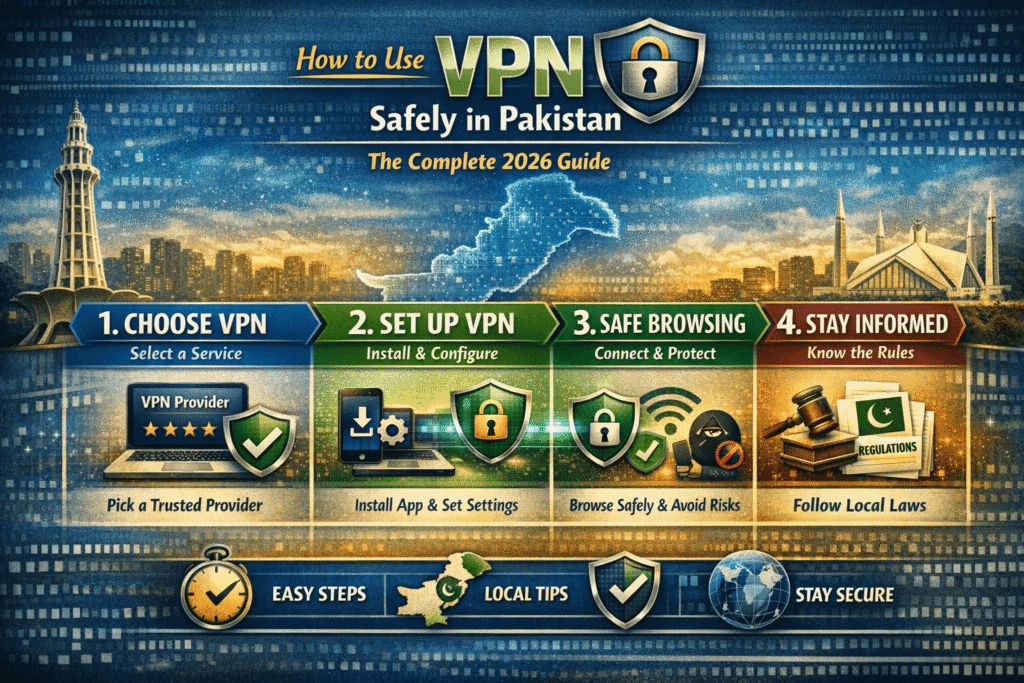
To use a VPN safely in Pakistan, choose a reputable paid provider with a no-logs policy, enable the kill switch feature, avoid free VPNs, and always connect before browsing on public WiFi. Use protocols like WireGuard or OpenVPN for strong encryption, and keep your VPN app updated to prevent data leaks.
To use a VPN safely in Pakistan, choose a reputable paid provider with a no-logs policy, enable the kill switch feature, avoid free VPNs, and always connect before browsing on public WiFi. Use protocols like WireGuard or OpenVPN for strong encryption, and keep your VPN app updated to prevent data leaks.
What Is a VPN and Why Pakistan Users Need It More Than Ever
A Virtual Private Network, or VPN, is a technology that creates an encrypted tunnel between your device and the internet. When you connect through a VPN server, your real IP address is hidden, your internet traffic is scrambled end-to-end, and your Internet Service Provider (ISP) cannot see what websites you visit or what data you send. Think of it as a private, armored road running through the middle of a busy, unprotected highway.
For users in Pakistan, the need to understand how to use VPN safely has grown dramatically over the past few years. Pakistan Telecommunication Authority (PTA) has blocked or throttled dozens of platforms — including Twitter/X during various political events, Wikipedia at different points, and multiple news portals. Freelancers working on platforms like Upwork, Fiverr, or Toptal sometimes experience unexpected slowdowns routed through national internet exchanges. Meanwhile, cybercrime incidents involving data theft on unprotected public WiFi in cities like Lahore, Karachi, and Islamabad have been rising.
Beyond censorship and access, VPNs serve a fundamental privacy function. Pakistan ranks among countries where ISPs are legally required to retain user data logs. Without a VPN, your browsing history, app usage, and location are fully visible to your ISP and, by extension, any government agency that requests that data. A properly configured VPN ensures your digital footprint stays yours alone.
That said, a VPN is not a magic shield. Used incorrectly — through an untrustworthy provider, without proper settings, or while misunderstanding what it does and doesn’t protect — a VPN can give you a false sense of security while exposing you to new risks. That’s precisely why knowing how to use VPN safely matters more than just knowing how to install one.
Is VPN Legal in Pakistan? PTA VPN Rules 2026
VPNs are legal in Pakistan, but they are strictly regulated by the Pakistan Telecommunication Authority (PTA). The government does not fully ban VPN usage; however, it requires compliance with specific rules. In recent years, PTA has introduced a licensing system for VPN providers and encouraged users—especially businesses, freelancers, and IT companies—to use registered or approved VPN services.
Under the latest PTA framework (2025–2026), licensed VPN providers can legally offer services, and users can access them without separate registration in some cases. However, unregistered or unauthorized VPNs may face throttling, blocking, or disruption, as authorities aim to control misuse and ensure cybersecurity.
Overall, VPN use is allowed for legitimate purposes such as remote work, security, and business communication—but using VPNs to access prohibited or illegal content can lead to legal consequences under Pakistani law.
This is one of the most-searched questions among Pakistani internet users, and the answer deserves clarity rather than ambiguity. As of 2026, VPN use in Pakistan is not outright illegal for individuals — but it operates in a legal grey area shaped by PTA regulations and the Prevention of Electronic Crimes Act (PECA) 2016.
The PTA has periodically issued notices directing ISPs to block certain VPN protocols (particularly OpenVPN on standard ports) and has required businesses to register their VPN infrastructure if it’s used for corporate purposes. This means a large enterprise running a private VPN to connect remote offices is technically required to register with PTA. However, an individual using a commercial VPN service for personal browsing has not been the subject of enforcement actions to date.
Important: Using a VPN to commit illegal activities — including accessing illegal content or conducting fraud — remains fully prosecutable under PECA 2016, regardless of VPN use. A VPN does not grant legal immunity.
VPN safety for Pakistani users also means choosing a provider that is not headquartered in a country with intelligence-sharing agreements with Pakistan. Providers based in Switzerland, Iceland, or British Virgin Islands generally offer stronger legal protections for user data. When people ask “is VPN safe in Pakistan,” the honest answer is: yes, if you choose the right provider and use it for lawful purposes.
Step-by-Step: How to Use a VPN Safely
Many guides tell you to simply “download and connect.” Real VPN safety in Pakistan requires several deliberate configuration steps that most beginner guides skip entirely. Here is a detailed walkthrough:
1. Choose a reputable, paid VPN provider
Research providers that publish independent third-party audits of their no-logs policy. Proven options include Mullvad, ProtonVPN, and ExpressVPN. Avoid any VPN that cannot show you an audit report — this is the single most important filter. For Pakistan-specific performance, look for providers with servers in nearby regions (UAE, Singapore, UK) so speeds stay usable.
2. Enable the kill switch before you browse anything
A kill switch cuts your internet connection instantly if the VPN drops unexpectedly. Without it, your real IP is exposed to your ISP and any website you’re visiting during that split second. On mobile and desktop apps, look for “Kill Switch” or “Network Lock” in settings and toggle it on. Never browse without this active.
3. Select a secure protocol — WireGuard or OpenVPN
Most VPN apps now offer WireGuard as the default protocol and it is excellent: faster than older protocols and cryptographically modern. OpenVPN (TCP mode) is more reliable on networks that block standard VPN ports, which matters in Pakistan where ISPs have throttled certain protocols. Avoid PPTP entirely — it is outdated and crackable.
4. Enable DNS leak protection
Even when your VPN is active, your DNS queries can “leak” through your ISP’s default DNS servers, revealing which sites you visit. Go into your VPN settings and enable DNS leak protection, or manually set your DNS to the VPN provider’s own DNS servers. You can verify this is working at dnsleaktest.com after connecting.
5. Connect before opening any apps or browsers
A common mistake — especially on mobile — is opening WhatsApp, Chrome, or banking apps before the VPN has fully connected. Your device sends traffic for those apps the moment they open. Make it a habit to connect your VPN first, confirm the green “connected” status, and only then open other apps.
6. Keep your VPN app and device OS updated
VPN apps regularly patch security vulnerabilities. An outdated VPN app can have exploitable bugs that defeat its own encryption. Set your VPN app to auto-update, and keep your Android, iOS, or Windows software current. This is VPN safety advice that almost no beginner guide emphasizes, but it is critical in practice.
7. Use two-factor authentication on your VPN account
If your VPN account credentials are stolen, someone can log in from another location and access your plan. Enable 2FA (two-factor authentication) on your VPN provider’s account dashboard to prevent this. Your VPN protects your traffic — 2FA protects your account itself.
Pro tip for Pakistan: If you find that your VPN is being blocked on certain networks (common on university WiFi or office networks with deep packet inspection), switch to the Obfsproxy or Stealth/Camouflage mode offered by many premium providers. This disguises VPN traffic as regular HTTPS, making it much harder to detect and block.
Free VPN vs Paid VPN Safety — Full Comparison
One of the most-asked questions among Pakistani students, freelancers, and mobile users is whether free VPNs are safe to use. The short answer is: most are not, and some are actively dangerous. Here is a detailed comparison to help you make an informed decision:
| Feature | Free VPN | Paid VPN |
|---|---|---|
| No-logs policy (audited) | Rarely audited or proven | Independently verified by top providers |
| Data selling risk | High — many monetize user data | Low — revenue from subscriptions, not data |
| Kill switch | Usually absent | Standard feature |
| DNS leak protection | Often missing | Included and configurable |
| Bandwidth limits | Capped (usually 500MB–2GB/month) | Unlimited on most plans |
| Server count & locations | Limited, often congested | Hundreds of servers globally |
| Speed & reliability | Slow and inconsistent | Fast, with dedicated infrastructure |
| Malware/adware risk | Documented cases of malware injection | None (with reputable providers) |
| Suitable for banking | Strongly not recommended | Safe with proper configuration |
| Cost | Free | PKR 400–1200/month (approx.) |
A 2023 study by Top10VPN analyzed over 280 free VPN apps on Android and found that 38% contained malware, and over 80% leaked users’ real IP addresses or DNS queries. These are not negligible risks — they are deal-breakers. If budget is genuinely a constraint, ProtonVPN’s free tier is the one exception widely regarded as safe: it has a strict no-logs policy, uses the same encryption as their paid product, and does not sell data.
Never use a free VPN for online banking in Pakistan. A malicious free VPN can intercept your login credentials, session tokens, and OTP codes in transit. The financial risk far outweighs any savings on a VPN subscription.
How to Use VPN Safely on Public WiFi in Pakistan
Pakistan’s major cities have seen a sharp expansion in public WiFi hotspots — in shopping malls, co-working spaces, cafes, airports, and university campuses. While convenient, these networks are a primary hunting ground for hackers using tools like “evil twin” access points (a rogue hotspot mimicking a legitimate one) and ARP spoofing to intercept unencrypted data in real time.
A Lahore-based IT security consultant once shared an eye-opening account: at a popular co-working space in Gulberg, he ran a passive network monitor and within 20 minutes captured unencrypted login sessions from three different users — none of whom were doing anything unusual, just checking emails and accessing their work dashboards. None of them had a VPN active. This is not a theoretical threat. It happens regularly in high-density public WiFi environments.
When using public WiFi in Pakistan — or anywhere — follow these VPN safety tips:
- Connect to your VPN immediately after joining any public network, before opening any app.
- Do not dismiss certificate warnings in your browser — these may indicate a man-in-the-middle attack is in progress.
- Use a VPN server geographically close to Pakistan (UAE or Singapore) for the best speed-to-security balance.
- After connecting, verify your IP has changed using whatismyip.com or ipleak.net.
- Disable auto-join for unknown WiFi networks in your device settings so you never accidentally connect without a VPN active.
- Prefer using mobile data (4G/5G) over public WiFi for sensitive transactions when possible, even with a VPN.
VPN for Freelancers and Online Banking Safety in Pakistan
Pakistan has one of the fastest-growing freelancer economies in Asia. With hundreds of thousands of professionals earning in dollars through Upwork, Fiverr, Freelancer, and other global platforms, VPN safety for freelancers in Pakistan has become a business-critical topic — not just a privacy preference.
Freelancers in Pakistan face several unique VPN-related challenges. Certain payment gateways and platforms flag Pakistani IP addresses as high-risk and require additional verification steps. Using a VPN with a clean US or UK IP can smooth these friction points. However, it also introduces an important caution: using a VPN to misrepresent your location to a platform in violation of their Terms of Service can result in account suspension.
For VPN for banking safety in Pakistan, the considerations are different. Pakistani banks including HBL, MCB, and Meezan Bank’s online portals generally work fine with a VPN active, but some have geo-detection systems that may flag unusual logins from foreign IP addresses. To avoid a temporary lock on your account, either use a Pakistani IP (if your VPN supports it) or notify your bank before traveling or switching to a foreign server. Several premium VPN providers now offer dedicated Pakistani IP addresses specifically for this use case.
Common VPN Mistakes and How to Avoid Them
Assuming VPN = Complete Anonymity
A VPN hides your traffic from your ISP and masks your IP from websites, but it does not make you anonymous. If you are logged into Google, Facebook, or any account, those services can still track you via cookies, device fingerprinting, and account activity. For true anonymity, you would also need to use the Tor browser, avoid logging into accounts, and use a privacy-focused search engine like DuckDuckGo.
Choosing VPN Location Without Thinking
Many users just click the nearest or “fastest” server without considering the legal jurisdiction. A VPN server physically located in a country with mandatory data retention laws (like the US or UK) means logs could theoretically be subpoenaed, even if the VPN claims no-logs. For maximum privacy, route through Switzerland, Iceland, or Panama — countries with no mandatory data retention laws and strong privacy protections.
Ignoring WebRTC Leaks
WebRTC is a browser feature that enables video calls and file sharing. It can bypass your VPN and reveal your real IP directly to websites, even when fully connected. This is one of the most overlooked VPN risks. Disable WebRTC in your browser settings or use browser extensions like uBlock Origin (which has a WebRTC blocker) to prevent this leak.
Using VPN on One Device and Not Others
Pakistani users often install a VPN on their laptop but forget their phone — which is often where most banking, messaging, and social media activity happens. Either use a VPN provider that supports multiple simultaneous connections (most do, typically 5–10 devices), or configure a VPN at the router level so every device in your home is protected automatically.
Frequently Asked Questions
Below are the most commonly asked questions by Pakistani users, including Google autocomplete suggestions: